
A digital product website gives potential customers one place to understand your product, review its price, and decide whether it fits their needs. It does not need dozens of pages or complicated features. A clear structure, useful product information, a working checkout process, and accessible support details are enough to create a practical starting point.
This guide explains how to build a digital product website for an ebook, software tool, template, course, script, or other downloadable product. It also covers the basic costs, policies, and partner information you may need as your product business develops.
1. Decide What Your Digital Product Website Needs to Do
Before choosing a platform or designing pages, define the website's main purpose. A product website should help visitors answer a few basic questions:
- What is this product?
- Who is it designed for?
- What problem does it address?
- What is included in the purchase?
- How much does it cost?
- How does delivery work?
- Where can customers get help?
If visitors cannot find these answers, even an attractive website may leave them uncertain about purchasing.
Start with the product itself. Write a short description that explains what it does and who may benefit from using it. Avoid beginning with a long list of technical features. Explain the practical purpose first, then provide the details that help buyers evaluate the offer.
For example, a website for a spreadsheet template might explain that the product helps users organize project information. It can then describe the spreadsheet format, included worksheets, compatibility requirements, and instructions.
Your positioning should remain consistent across the homepage, product page, checkout, and promotional materials. If you need help defining that message, see the guide to digital product positioning.
Choose a simple website structure
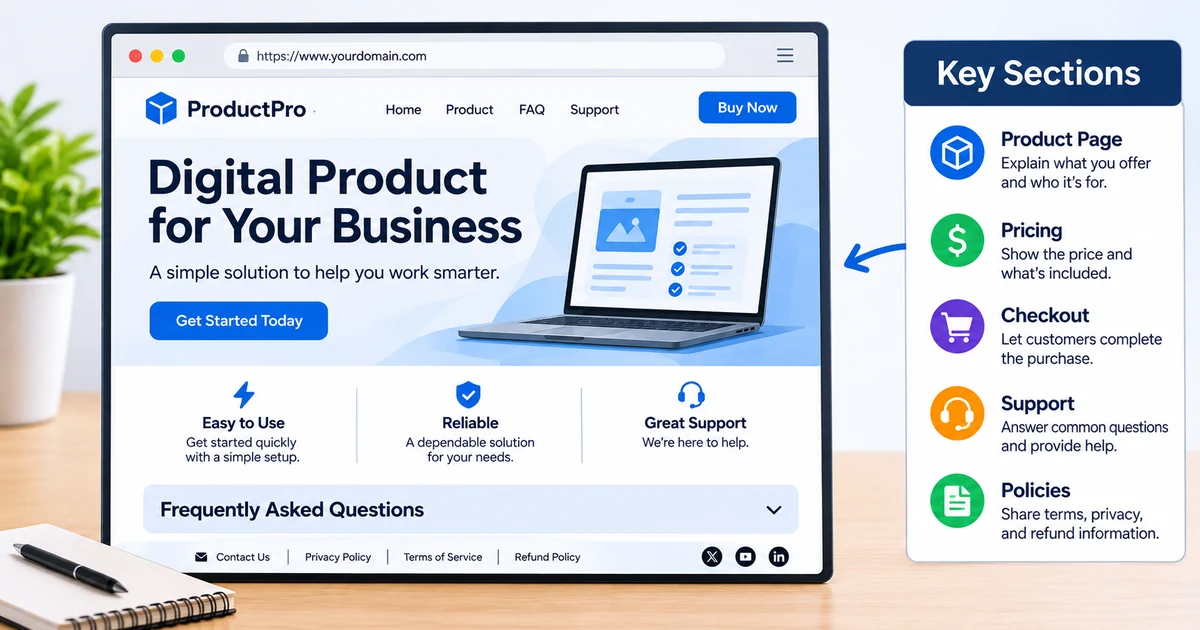
A small digital product business can often start with a limited set of pages.
| Page | Main purpose |
|---|---|
| Homepage | Introduce the product or product catalog |
| Product page | Explain one specific product and its offer |
| Pricing or checkout | Show the price and provide a purchase path |
| FAQ | Answer common questions |
| Support or contact | Explain how customers can request help |
| Policies | Present applicable terms, privacy, and refund information |
| Partner or JV page (optional) | Give affiliates and potential partners information about the product and how to evaluate or promote it |
These do not necessarily need to be separate pages. A single-product website may combine the homepage and product page, while placing FAQs and support information further down the same page.
A separate partner or JV page is optional. If you plan to work with affiliates, it can give potential partners a place to review the product, its intended audience, approved promotional materials, and relevant partner information. You can publish this page on your own domain.
The important point is that visitors can find the information without navigating through unnecessary sections.
A domain and hosting are ordinary business expenses when you operate a product website. Launch System Lab's refund terms refer to a domain cost of about $10. Actual domain and hosting costs depend on the provider and arrangement you choose, so check current pricing before committing.
For a more detailed look at product setup, pricing, and partner-facing materials, see Sell What You Built.
2. Build a Product Page That Explains the Offer
The product page is usually the most important part of a digital product website. It should provide enough information for someone to understand what they are considering before reaching checkout.
A useful product page follows a logical sequence.
Start with a clear product introduction
The first section should identify the product and explain its main purpose.
Include:
- Product name.
- A short explanation of what it does.
- The intended audience.
- The main problem or task it addresses.
- A relevant product screenshot, cover image, or preview.
Avoid vague descriptions such as "the ultimate solution for everyone." Specific language is more useful because visitors can decide whether the product matches their situation.
For example:
A project planning spreadsheet for independent creators who want to organize tasks, deadlines, and project information in one place.
This description identifies the format, intended audience, and purpose without making unsupported claims.
Explain what customers receive
A digital product can be difficult to evaluate when buyers cannot physically inspect it. Make the contents clear.
For an ebook, describe its subject, format, and major sections. For software, explain its supported environment, main functions, and installation requirements. For a template, identify the included files, formats, and any required applications.
A simple contents list can help:
- Main product file.
- Setup or installation instructions.
- Included templates or supplementary materials.
- Access or download instructions.
- Any stated compatibility requirements.
Only list items that are actually included. If an additional resource is planned but not ready, do not present it as part of the current offer.
Use relevant product visuals
Images should help visitors understand the product rather than simply decorate the page.
Useful examples include:
- An ebook cover and a few sample pages.
- Screenshots of a software interface.
- A preview of a template with sample data.
- A diagram explaining how a product is organized.
Use clear images with enough detail to communicate what customers will receive. If a screenshot contains sample information, make sure it does not expose private customer data or credentials.
3. Present Pricing and Checkout Clearly
Pricing should be easy to find and understand. Visitors should not have to search through several pages to discover the cost or determine what a purchase includes.
A pricing section should state:
- The product price.
- Whether payment is one-time or recurring.
- What is included at that price.
- Any relevant purchase or access conditions.
- Where the customer proceeds to complete payment.
If there are multiple versions, explain the differences. A comparison table can make the choice easier.
| Detail | Basic version | Extended version |
|---|---|---|
| Main product | Included | Included |
| Additional resources | Not included | Included |
| Support | State actual terms | State actual terms |
| Price | Display actual price | Display actual price |
This is an example structure, not a recommendation to create multiple versions. Use only the options your product actually offers.
Check the complete purchase process
A pricing section is only useful when the checkout process works as expected.
Before publishing, test the full customer journey:
- Open the product page as a visitor.
- Select the purchase option.
- Follow the checkout process.
- Check the information displayed before payment.
- Complete a test purchase if your payment provider supports testing.
- Confirm that the delivery instructions or access details are correct.
Pay particular attention to the transition between checkout and delivery. Customers should know what happens after payment and where to find their product.
For downloadable products, explain whether a download link, account access, or another delivery method is used. For software, provide the relevant installation or access instructions.
A website that describes the product well but sends customers into an unclear checkout process is incomplete.
4. Add FAQ, Support, and Policy Information
A digital product website should address questions that may prevent someone from making an informed decision.
An FAQ section is a practical place to answer recurring questions without making the main product description excessively long.
Write useful FAQ answers
Questions depend on the product, but common topics include:
- What format is the product provided in?
- Which devices or applications are supported?
- How is the product delivered?
- Are updates included?
- Does the purchase include technical support?
- What should a customer do if a download does not work?
- Where can customers review the applicable refund terms?
Keep answers direct. If a condition is important, explain it before purchase rather than hiding it in a long paragraph.
Do not claim compatibility with an operating system, application, or device unless you have verified it. The same applies to updates, support availability, and included resources.
Make support easy to find
Customers need a clear way to ask for help after purchasing.
A support or contact section should explain:
- Which channel customers should use.
- What kinds of issues the channel handles.
- What information customers should include.
- When they can generally expect a response, if a response time has been established.
For Launch System Lab products, customers can contact support at support@launchsystemlab.com or use the contact page. The published support response time is 24–48 business hours.
A support process does not need to be complicated. It does need to be visible and consistent with the service you can actually provide.
Link to relevant policies
Make applicable legal and purchase policies accessible from the website. Depending on the business, these may include:
- Terms of Service.
- Privacy Policy.
- Refund Policy.
- Product-specific usage or license conditions.
Do not copy policy language from another business without checking whether it applies to your product and operating model. Make sure your published policies reflect the actual product, checkout arrangement, data practices, and support process.
For an example of how Launch System Lab presents its purchase conditions, review the refund policy.
This article provides general information, not legal advice. Check the laws that apply where you and your customers are located.
5. Review and Publish Your Website
Once the main pages and sections are ready, review the website as if you were a first-time visitor.
The goal is not to make every design element perfect. It is to ensure that the product information is accurate, the purchase path works, and customers can find the information they need.
Use a pre-publication checklist
| Area | What to check |
|---|---|
| Product introduction | Name, purpose, and intended audience are clear |
| Product details | Features and included files are accurate |
| Visuals | Images represent the actual product |
| Pricing | Price and payment terms are visible |
| Checkout | Purchase links and payment flow work |
| Delivery | Post-purchase instructions are correct |
| FAQ | Common product and purchase questions are answered |
| Support | Contact details and support process are visible |
| Policies | Applicable policy pages are accessible |
| Partner page | If applicable, partner information and promotional materials are accurate |
| Domain | The website uses the intended domain and the domain remains active |
| Mobile layout | Text, images, and navigation work on smaller screens |
| Links | Internal and external links lead to the correct destinations |
Avoid common website mistakes
A few problems appear repeatedly on small product websites.
Too much information before explaining the product. Visitors should understand the offer near the beginning of the page. Put background information and detailed explanations further down.
Unclear product contents. Do not assume visitors know what a file, license, or package includes. Describe the actual deliverables.
Missing compatibility information. Software and templates often have requirements. State them clearly so buyers can check before purchasing.
Confusing pricing. Avoid making visitors calculate the real cost from scattered information. Present payment terms in one place.
Hidden support information. A contact link should be easy to find, especially for customers who have already purchased.
Unverified claims. Do not publish statements about performance, compatibility, customer results, or included services unless you can support them.
An incomplete partner page. If you plan to work with affiliates, make sure the partner page explains the product and provides accurate information. Do not publish promotional claims or terms that you cannot support.
After publishing, revisit the website whenever the product, pricing, checkout, delivery method, or support process changes. A simple website still needs maintenance to remain accurate.
If you are preparing a broader release, use the digital product launch checklist to review the other parts of your launch.
Key takeaways
- A digital product website should explain the product, present its price, support checkout, and make customer support accessible.
- Start with a simple structure based on the information buyers need rather than building unnecessary pages.
- A domain and hosting are ordinary business expenses; check current provider pricing before choosing a setup.
- A partner or JV page on your own domain can provide useful information to potential affiliates when you plan to work with them.
- Describe the actual product contents, compatibility requirements, delivery method, and purchase conditions.
- Test the complete checkout and delivery process before publishing.
- Review product information, links, policies, and support details whenever the offer changes.