
Digital product positioning is the process of defining who your product is for, what problem it addresses, and why the intended customer should consider it. It gives your product a clear place in the market and helps you explain its purpose without relying on vague claims or feature lists.
Good positioning starts before you write a sales page or prepare promotional materials. Whether you sell software, an ebook, a course, a template, or a digital service, you need a clear explanation of what you offer and who it is intended to help.
1. What Is Digital Product Positioning?
Digital product positioning describes how you want your intended audience to understand your product in relation to their needs and available alternatives.
It is not just a tagline, product name, or short sales headline. It is the foundation behind the way you describe the product, organize its features, set expectations, and communicate its value.
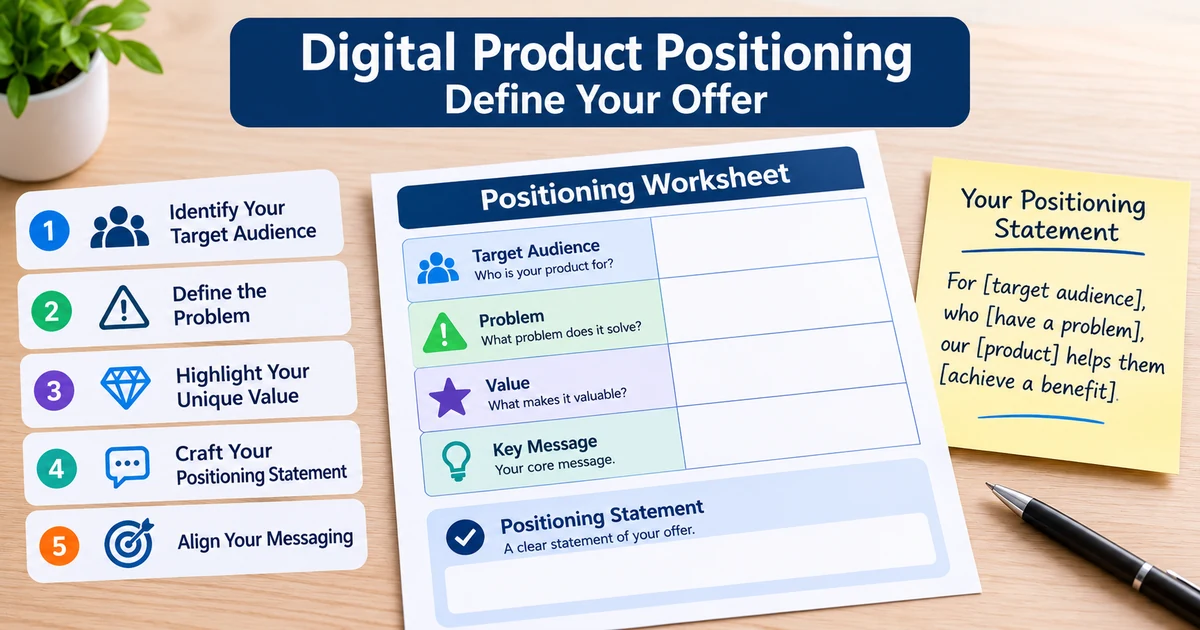
A useful positioning statement answers four questions:
- Who is the product for? Identify the type of person or business that is most likely to need it.
- What problem does it address? Describe the task, difficulty, or situation the product is designed for.
- What does the product provide? Explain its main function, contents, or deliverables.
- Why is this approach relevant? Clarify what makes the product useful to the intended audience.
For example, saying that you sell a project management template is a product description. Explaining that the template is designed for independent creators who need a simple way to organize client projects gives the product a more specific position.
The second description helps a potential customer decide whether the product is relevant to their situation.
Positioning is not the same as promotion
Promotion is how you communicate an offer through channels such as email, social media, communities, or partner campaigns.
Positioning comes first. It determines what those promotional messages should communicate.
If your positioning is unclear, each promotional channel may describe the product differently. One message might emphasize convenience, another might focus on features, and another might target a completely different audience.
A clear position gives you a consistent foundation for all of them.
2. Define the Audience and the Problem
The first practical step in digital product positioning is narrowing down your intended audience.
Trying to describe a product as useful for everyone makes it harder for a specific person to recognize why they should care. You do not need to exclude every other potential buyer, but you should know who the product was primarily designed for.
Start with the following questions:
- What type of person or business would use this product?
- What are they trying to accomplish?
- What task currently takes too much effort?
- What difficulty does the product help address?
- What knowledge, tools, or resources do they already have?
- What requirements might prevent them from using the product?
Be specific enough to describe a real situation.
For example, "people who want to be more productive" is a broad audience. "Freelancers who manage several client projects and need a consistent way to track tasks" describes a more recognizable group and use case.
Describe the problem without exaggerating it
A product does not need to solve a major problem to be useful. It may help someone organize information, complete a repetitive task, learn a process, or manage a specific part of their work.
Describe the problem accurately.
Avoid statements that suggest every potential customer has the same difficulty. Do not claim that a product eliminates a problem if it only helps manage part of it.
A practical problem statement can follow this structure:
[Audience] needs a way to [task or goal] because [specific difficulty or limitation].
For example:
Independent creators need a consistent way to organize product launch tasks because important preparation steps can become difficult to track across separate documents and tools.
This statement does not promise a particular outcome. It identifies an audience, a task, and a practical reason the product may be relevant.
When you discuss possible customer or business outcomes, use qualified language and avoid presenting them as certain. Review the Earnings Disclaimer when describing results or outcomes.
3. Connect Product Features to Customer Value
Once you understand the audience and problem, connect the actual product to that situation.
This is where many product descriptions become difficult to understand. Creators often know their product in technical detail, so they describe what they built instead of explaining what a customer can do with it.
A feature describes what the product contains or does. A benefit explains why that feature may matter to the intended user.
Consider this example:
| Product feature | Customer-facing explanation |
|---|---|
| Pre-built project categories | Gives users a starting structure for organizing work |
| Editable task fields | Allows users to adapt the template to their workflow |
| Progress tracking | Helps users review the status of individual tasks |
| Setup instructions | Explains how to begin using the template |
The explanations should match the real product. Do not add capabilities simply because they would make the offer sound more attractive.
Separate essential features from secondary features
Not every feature deserves equal attention in your positioning.
Group your product features into three categories:
- Core features: The functions or contents directly related to the main problem.
- Supporting features: Elements that make the core product easier to use or understand.
- Optional extras: Additional materials or capabilities that are useful but not central to the main offer.
Your primary product description should focus on the core features. Supporting features can provide additional detail, while optional extras can appear later in the sales page.
This structure helps readers understand the product without having to process a long list of specifications.
Be clear about limitations
Good positioning also explains what the product does not do.
For software, this might include system requirements or supported environments. For a course, it might include the topics covered and those left out. For a template, it might include the software needed to open or edit the files.
Limitations are part of the offer. Explaining them helps potential customers decide whether the product fits their situation.
4. Write a Clear Positioning Statement
After defining the audience, problem, and product, combine them into a short positioning statement.
Use this simple structure:
[Product] is for [intended audience] who need to [address a specific problem or task]. It provides [main function or deliverable] so they can [practical use or purpose].
This is an internal working statement. It does not need to appear word for word on your sales page.
For example:
A project planning template for independent creators who need to organize product launch tasks. It provides an editable structure for recording preparation steps, responsibilities, and progress.
The statement identifies the audience, the use case, and what the customer receives. It does not rely on unsupported claims.
Turn the statement into product messaging
Once your positioning statement is clear, use it to prepare the main parts of your product page.
| Page element | Question it should answer |
|---|---|
| Headline | What is the product and who is it for? |
| Opening paragraph | What situation does it address? |
| Feature list | What does the customer receive? |
| Product preview | What does the product look like or how does it work? |
| Requirements | What does the customer need before using it? |
| Pricing section | What does the purchase include and cost? |
| FAQ | What questions or limitations should buyers understand? |
Keep the language consistent across these sections. If your headline describes a product for independent creators, the rest of the page should not suddenly position it as an enterprise solution.
You can also review the digital product launch checklist to see how positioning fits into the wider preparation process, including pricing, website setup, checkout, delivery, and support.
5. Position Your Product for Partners and Affiliates
If you intend to work with affiliates or promotional partners, positioning becomes important beyond your own sales page.
A potential partner needs to understand the product before deciding whether it is relevant to their audience. A vague description makes that evaluation difficult.
Your partner-facing materials should communicate:
- The intended customer.
- The problem the product addresses.
- What the buyer receives.
- The product's main features and limitations.
- The type of audience likely to find it relevant.
- The promotional claims partners can accurately make.
Avoid asking partners to invent their own explanation of the product. Give them enough accurate information to describe it consistently while allowing them to adapt the wording to their audience.
Prepare useful partner materials
A partner page or affiliate information page can bring the relevant details together in one place. It may include a product overview, product previews, audience information, partner terms, and approved promotional resources.
You can also prepare swipe copy: suggested email or promotional text that partners can adapt for their own audiences. The copy should describe the actual product and avoid claims that you cannot substantiate.
Before approaching potential partners, make sure your product website explains the offer without requiring a private conversation. Prepare product previews, relevant documentation, and promotional materials that reflect the actual product.
If you maintain your own product website, remember that a domain and hosting are ordinary business expenses. Launch System Lab's refund terms refer to a domain cost of about $10; actual domain and hosting costs depend on the provider and arrangement you choose.
The book Sell What You Built covers the process of packaging a finished digital product so affiliates and partners can evaluate and promote it. Its focus includes product setup, pricing, product websites, promotional assets, and partner-facing materials.
The positioning work described in this article supports that broader process. It helps you establish what the product is and who it is for before preparing materials for other people to share.
6. Review and Improve Your Positioning
Positioning is not necessarily permanent. Your understanding of the audience may change as you receive questions, observe how people use the product, or revise its contents.
Review your positioning whenever you make a meaningful change to the product or offer.
Use this checklist:
- [ ] The intended audience is clearly defined.
- [ ] The problem or task is specific and realistic.
- [ ] The product description explains what buyers receive.
- [ ] The main features connect to the intended use case.
- [ ] Important requirements and limitations are visible.
- [ ] The sales page uses consistent language.
- [ ] Promotional materials describe the same offer accurately.
- [ ] Partner-facing information is clear, if you use affiliates.
- [ ] No statement promises results that the product cannot guarantee.
You can also ask someone unfamiliar with the product to read your description. Ask them what they think the product does, who it is for, and what they would receive after purchasing it.
If their interpretation differs significantly from your intention, revise the description.
Do not change your positioning simply to make the product sound more impressive. The objective is to make the offer easier to understand and evaluate.
Key takeaways
- Digital product positioning defines the audience, problem, product, and reason the offer is relevant.
- Start with a specific customer situation instead of describing your audience as everyone.
- Connect features to practical uses without adding capabilities or unsupported claims.
- Use a clear positioning statement as the foundation for your sales page and promotional materials.
- Give affiliates and partners accurate information and adaptable swipe copy so they can evaluate and describe the product consistently.
- Treat domain and hosting as ordinary business expenses when planning your product website.
- Review your positioning when the product, audience, or offer changes.