
X account warming is the practice of using an account normally and cautiously before increasing its activity. The idea is to avoid treating a new or inactive account as a channel for sudden, concentrated follow and unfollow activity. ReplyPilot includes Farm Feed, a feature designed to move through the X feed as part of an account-warming workflow.
Account warming does not guarantee that X will approve an account's activity or prevent restrictions. Platform rules still apply, and using automation may create additional risks. This guide explains what Farm Feed does, how it differs from other ReplyPilot functions, and what to review before using X automation.
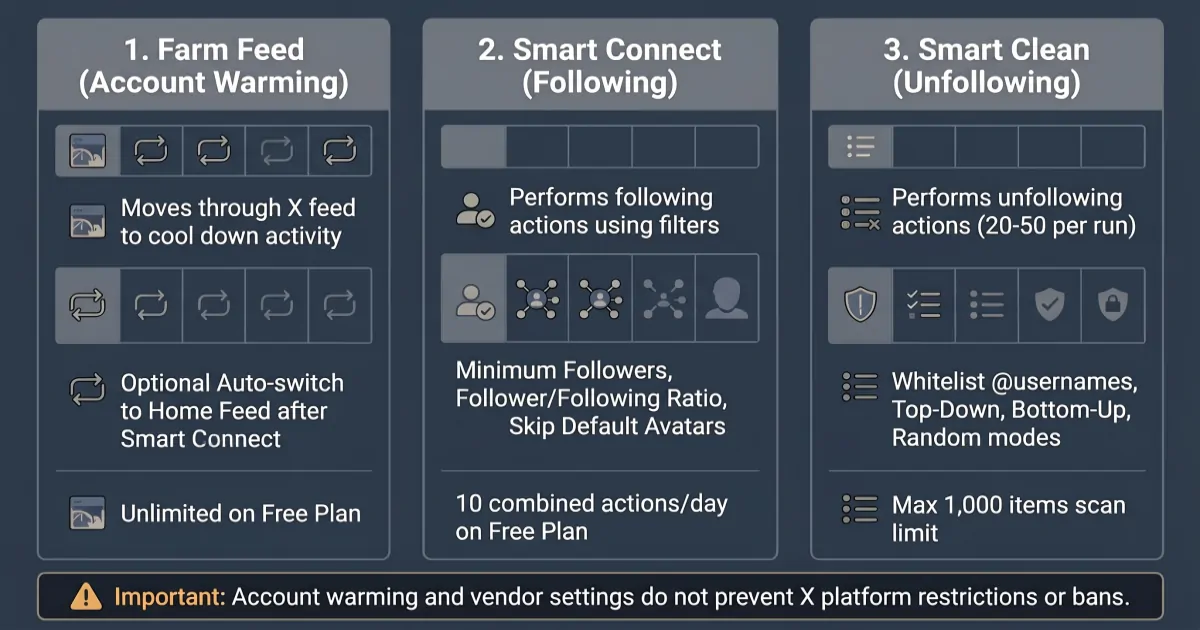
TODO: Create an original 1200x630 WebP illustration showing the distinction between Farm Feed, Smart Connect, and Smart Clean. Do not imply that account warming prevents detection or restrictions.
What Is X Account Warming?
X account warming, sometimes called Twitter account warming, refers to building ordinary account activity rather than immediately performing large volumes of repetitive actions.
People use the term when discussing new accounts, inactive accounts, or accounts that have not been used regularly. The practical idea is to establish a normal pattern of account use before considering additional activity.
Warming is not a special account status issued by X. It is also not a guarantee of account quality, reach, or continued access.
A cautious approach means understanding the platform's rules, using the account normally, and avoiding aggressive or indiscriminate activity.
Why account warming is discussed
An account that suddenly performs many repetitive actions may attract platform scrutiny. X's rules address spam and platform manipulation, including certain forms of bulk or aggressive following and unfollowing.
That does not mean there is a universal warming schedule that makes automation acceptable. No third-party tool can promise that a particular sequence of actions will prevent restrictions.
For a broader overview of automation limits and account risks, see our guide to X automation limits.
How ReplyPilot's Farm Feed Works
Farm Feed is ReplyPilot's account-warming feature. It moves through the X feed as part of a workflow intended to cool down account activity.
It is separate from Smart Connect and Smart Clean. Those functions perform follow and unfollow actions, while Farm Feed is used for feed browsing.
The distinction matters because account warming should not be confused with increasing follower counts or removing accounts from a following list.
Farm Feed
Farm Feed moves through the feed to support an account-warming routine. It is not a follow or unfollow function.
The Free plan includes unlimited Farm Feed use. This is separate from the Free plan's combined daily allowance for Smart Connect and Smart Clean.
The product documentation does not specify that Farm Feed uses randomized scrolling intervals or simulates human browsing behavior. It should therefore be understood by its documented function, not as a method for avoiding platform detection.
Smart Connect
Smart Connect is ReplyPilot's follow function. It lets users apply filters before selecting accounts to follow.
The documented filters include:
- Minimum Followers: Filter accounts based on a minimum follower count.
- Follower/following Ratio: Apply a ratio filter.
- Skip Default Avatars: Exclude accounts using default profile avatars.
Smart Connect is distinct from Farm Feed. Using it means performing follow actions, which carry their own platform and account risks.
Smart Clean
Smart Clean is ReplyPilot's unfollow function. It helps users select accounts to unfollow using the available options.
The documented controls include:
- A selection of 20–50 accounts to unfollow per run.
- A whitelist of usernames to protect selected accounts from being included.
- Top-Down, Bottom-Up, and Random selection modes.
- A list scan capped at 1,000 items.
- The requirement to keep the X tab visible while scanning.
Smart Clean should not be treated as a way to repeatedly remove accounts after following them. The ReplyPilot manual warns against follow churning: mass-following and then mass-unfollowing, or performing heavy follow and unfollow activity on the same day.
Using Farm Feed Alongside Other ReplyPilot Functions
Farm Feed, Smart Connect, and Smart Clean have different purposes. A useful workflow starts by understanding those differences rather than treating all three functions as interchangeable automation.
A basic review process looks like this:
- Review the account first. Check its age, recent activity, and current account status. Do not assume that an account needs automation simply because it is new or inactive.
- Understand Farm Feed. Use the feature for its documented feed-browsing and account-warming purpose. Do not interpret it as protection against restrictions.
- Review Smart Connect filters. If you decide to use the follow function, understand the available filters and the accounts they may select.
- Understand Smart Clean separately. Review its selection modes and whitelist before using the unfollow function.
- Avoid follow churning. Do not mass-follow and then mass-unfollow, or combine heavy follow and unfollow activity on the same day.
- Review platform rules regularly. X's policies can change, and using automation may violate platform rules.
ReplyPilot also provides an optional Auto-switch to Home Feed setting after Smart Connect. This changes the feed view after a Smart Connect operation. It is a workflow convenience; it should not be interpreted as a method to hide automation, break detection patterns, or reduce the likelihood of account restrictions.
There is no documented day-by-day schedule that guarantees an account is ready for increased activity. Avoid treating an example routine from another user or tool as an official X recommendation.
ReplyPilot Limits and Vendor Guidance
Before using follow or unfollow automation, understand the difference between ReplyPilot's product limits and its vendor recommendations.
Free plan action allowance
The Free plan has a combined daily limit of 10 follow/unfollow actions across Smart Connect and Smart Clean. This is not 10 actions for each function.
Farm Feed is unlimited on the Free plan. The action allowance for Smart Connect and Smart Clean is separate from Farm Feed usage.
Vendor-recommended daily activity
The ReplyPilot manual provides the following daily follow guidance:
| Account type | Vendor-recommended daily follows | Per-session guidance | Unfollows |
|---|---|---|---|
| New account (under 6 months) | 20–30 across 2–3 sessions | Not specified | Match follows |
| Warmed-up account | 50–80 | 40–50 | Match follows |
| X Premium account | 100–150 | 50 | Match follows |
These figures are ReplyPilot vendor guidance, not official X limits. They do not guarantee that an account can perform the listed actions without restrictions. Your account history, behavior, and the platform's current rules still matter.
The manual also recommends avoiding heavy following and unfollowing on the same day. Do not use the table as a target that every account should reach.
For the current feature instructions and usage guidance, read the ReplyPilot User Manual.
X Automation Safety and Account Restrictions
Account warming does not remove the risks associated with automation.
X has rules addressing spam and platform manipulation. Certain forms of bulk, aggressive, or indiscriminate following and unfollowing can violate those rules. Automation may lead to rate limits, account locks, restrictions, or suspension.
Before using any X automation tool:
- Read the current X rules and automation requirements.
- Understand which actions the tool performs on your behalf.
- Avoid aggressive or indiscriminate follow and unfollow activity.
- Do not treat vendor recommendations as permission from X.
- Stop and review your activity if the platform displays warnings or restrictions.
The use of ReplyPilot is your decision and carries platform-related risks. ReplyPilot cannot guarantee that an account will avoid restrictions or suspension. Account actions taken by X are not covered by the product's refund policy; review the ReplyPilot refund policy before purchasing.
You should also review the ReplyPilot product information to understand the extension and its available plans.
Frequently Asked Questions
Is X account warming the same as gaining followers?
No. Account warming refers to a cautious approach to account activity. Gaining followers is a separate objective. Farm Feed is the account-warming feature, while Smart Connect performs follow actions.
Does Farm Feed guarantee that an account will not be restricted?
No. Farm Feed does not guarantee protection from account restrictions, suspension, or other platform actions. No warming routine can override X's rules.
Is Twitter account warming different from X account warming?
The names refer to the same general practice. Twitter was renamed X, but people may still search for terms such as Twitter account warming or how to warm up a Twitter account.
Does the Free plan include Farm Feed?
Yes. Farm Feed is unlimited on the Free plan. Smart Connect and Smart Clean share a combined daily allowance of 10 follow/unfollow actions.
Does Auto-switch to Home Feed make automation safer?
No such claim is supported by the product documentation. Auto-switch to Home Feed changes the feed view after Smart Connect. It is a workflow option, not a guarantee of reduced detection or fewer account restrictions.
Key takeaways
- X account warming means using an account cautiously rather than starting with concentrated, repetitive activity.
- Farm Feed is ReplyPilot's account-warming feature. Smart Connect handles follows, while Smart Clean handles unfollows.
- The Free plan includes unlimited Farm Feed and a combined daily limit of 10 follow/unfollow actions across Smart Connect and Smart Clean.
- ReplyPilot's daily activity figures are vendor recommendations, not official X limits.
- Farm Feed and other automation features do not guarantee protection from account restrictions. Review X's rules and understand the risks before using automation.