
The All-in-One X Growth, Clean & AI Reply Engine
Run Under the Radar
The complete X (Twitter) Growth & Engagement Extension. Build your audience with Smart Connect and Smart Clean, write context-aware replies with BYOK AI Auto-Reply & Manual Suggest, and warm up your account with our 100% FREE Farm Feed engine.
Work Smart – Not Hard
Laser-Targeted Leads
Press 🔍 Enrich on any viral post in your niche to reveal real-time follower counts, ratios, and verification badges of commenters — then auto-follow high-intent users with Smart Connect.
AI Auto & Manual Reply (NEW)
Bring your own free Gemini or Groq key (or OpenAI). Reply on autopilot to accounts you follow on Home > Following, or click ✨ Suggest Reply on any tweet to draft, edit, and post yourself.
Smart Clean & Safety Engine
Keep your ratio healthy with Smart Clean (auto-unfollow non-followers) and run 🌱 Farm Feed 100% free with curved mouse movements, randomized delays, and smart breaks.
Core Features in v3.0
Everything you need to discover the right audience, engage naturally, and grow your network safely on X.
On-Demand Enrich & Passive Harvesting
Enrich commenters only when you click 🔍 Enrich and Load More, while passively harvesting user metrics from X's own timeline data to avoid unnecessary API lookups and 429 rate limits.
Smart Filtering & Connect
Only connect with real accounts. Filter by Minimum Followers, Following / Followers Ratio (%), X Premium / Standard status, and automatically skip default avatars ("eggs") and existing followers.
AI Auto-Reply (Following Feed)
Runs exclusively on Home > Following so you only reply to accounts you follow. Filter by max existing replies, post age, excluded words, topic keywords & ratio, and 5 rotating reply styles with automatic AI SKIP protection.
Manual Suggest & Safety Checks
Adds a ✨ Suggest Reply button to every X reply box. Pick from 5 styles, generate 1–5 drafts, optionally mention your product/website, and get real-time warnings for repetition, generic phrasing, or reply bursts.
Smart Clean Engine
Clean your Following list using Top-Down, Bottom-Up, or Randomized modes. Protect friends with a Whitelist, keep followers/verified users, and simulate profile hovering before unfollowing.
100% Local & BYOK Privacy
Runs locally inside your browser. Your X credentials are never touched, and your optional Gemini, Groq, or OpenAI API keys stay in your browser's local storage with direct browser-to-provider requests.
How It Works in 4 Simple Steps
No coding, no middleman servers. Set up in two minutes and grow on your own terms.
Browser & AI Setup
Add x.com to "Always keep active" in browser settings, and optionally paste a free Gemini, Groq, or OpenAI key in Settings.
Open Post & Enrich
Open any active post in your niche, click "🔍 Enrich" to scan visible commenters, and click "Load More" to fetch more prospects.
Connect or Clean
Click 🤝 Connect to auto-follow filtered prospects, or run 🧹 Clean on your Following list to remove non-followers.
AI Reply & Farm Feed
Run 🎯 Auto-Reply on your Following feed, click ✨ Suggest Reply while browsing manually, or run 🌱 Farm Feed for free warming.
Why ReplyPilot v3.0 Feels Different
Most X automation tools still rely on outdated mass-follow patterns or spammy search-reply bots that get accounts limited. ReplyPilot v3.0 was engineered for modern anti-bot systems with human-emulation and relationship-first safety.
Mass Follow & Background Scraping
Traditional auto-follow bots blindly follow random followers and burn API calls in the background on every page you visit.
- Random low-quality audiences
- Silent background lookups trigger 429 rate limits
- Easy bot detection patterns
- Unsafe mass-follow behavior
- Weak engagement quality
On-Demand Enrich & Viral Targeting
ReplyPilot combines passive timeline harvesting with on-demand enrichment on active tweets in your niche for high follow-back rates.
- Enriches only when you press Enrich / Load More
- Passive harvesting reuses X's own timeline data
- Smart ratio, follower, and avatar filtering
- Multi-tier rate caps & 30-day per-target cooldown
- Natural audience discovery
Spammy Keyword Auto-Reply Bots
Generic AI bots spam strangers across global search results with repetitive templates and unsolicited links, triggering quick restrictions.
- Replies to random strangers in search results
- Repetitive openings and generic "Great post!" fluff
- Comments on sensitive, political, or giveaway posts
- Drops spammy links in automated replies
- No rate ramp-up for newly installed accounts
Following-Feed Auto & Safety-Checked Manual Reply
ReplyPilot's Auto-Reply runs strictly on Home > Following, while Manual Suggest gives you one-click drafts with built-in safety and anti-repetition warnings.
- Auto-Reply only engages accounts you already follow
- AI automatically outputs
SKIPon unsuitable posts - 2-week new-install warm-up ramp (40% week 1, 70% week 2)
- Anti-repetition check against your 30-day local reply log
- Manual mode warns on stranger replies, bursts & spikes
Unsafe Mass Unfollow
Most unfollow bots rapidly remove accounts from your following list using repetitive automation patterns easily detected by X.
- Aggressive unfollow behavior
- Predictable click timing
- No human interaction logic
- Spam-like activity footprint
- Higher suspension risks
Smart Clean Engine
ReplyPilot performs stealth unfollow actions with physical scrolling, profile hover simulation, fake skips, and randomized delays.
- Top-Down, Bottom-Up, or Randomized unfollow modes
- 85% avatar hover simulation & 8% "fake skip" noise
- Built-in smart breaks & custom Whitelist protection
- Clean behavioral footprint
- Designed for account safety
Manual Account Warming
Growing multiple accounts usually requires manually browsing feeds for hours just to maintain trust and avoid shadow restrictions.
- Time-consuming manual work
- Difficult multi-account scaling
- No automation assistance
- Poor account maintenance
- High operational overhead
Unlimited Farm Feed Engine
ReplyPilot includes a completely free feed-farming engine that scrolls, expands long posts, skips ads in 14+ languages, and warms your account.
- Unlimited feed farming (100% Free)
- Automatically detects and scrolls past promoted ads
- Optional auto-switch to Farm Feed after Auto Follow
- Supports multi-account scaling
- Runs fully inside browser
Unsafe Background Automation
Modern browsers freeze inactive tabs while X monitors inactive viewing behavior. Many bots fail under modern anti-bot systems.
- Inactive tab detection
- Frozen browser execution
- DOM unloading issues
- Unnatural straight-line cursor jumps
- High shadowban risks
Stealth Background & Bezier Cursor Engine
ReplyPilot simulates realistic active-viewing state and curved Bezier mouse trajectories so sessions continue naturally.
- Simulated active viewing state (Visibility Spoofer)
- Curved Bezier mouse movement with natural overshoot
- Native clipboard paste keeps X's Draft.js editor clean
- Designed for modern X systems
- True stealth multitasking workflow
Privacy-First Installation
Scale Your X Account.
Starter / Free
- 10 Smart Connects/Cleans per day
- On-Demand Comment Enrichment
- Organic Browsing Simulation
- Unlimited Farm Feed (100% Free)
- Premium Filters (Avatar, Ratio, Verified)
- AI Auto-Reply (Home > Following)
- AI Manual Suggest & Product Mentions
ReplyPilot PRO Monthly
- Unlimited Smart Connects & Cleans
- AI Auto-Reply on Following Feed (BYOK)
- AI Manual Suggest Button (1–5 Drafts)
- Smart Product & Website Mentions + URL AI
- Premium Filters (Avatar, Ratio, Verified)
- 2 Browser Installations & Priority Support
ReplyPilot PRO Yearly
- All PRO v3.0 features included
- AI Auto-Reply & Manual Suggest included
- Save 77% vs Monthly
- 2 Browser Installations
- Priority Email Support
Frequently Asked Questions
Is this safe for my X/Twitter account?
Yes. Unlike server-side bots, ReplyPilot runs locally in your browser. We use on-demand DOM enrichment, passive timeline harvesting, curved Bezier mouse movements, and human-like randomized delays with Smart Breaks to mimic real user behavior and avoid 429 rate limits.
How do the new AI Auto-Reply and Manual Suggest modes work in v3.0?
In PRO, you can switch between two reply modes in Settings. Auto Mode runs on your Home > Following tab, reading posts from accounts you already follow, filtering them by reply count, post age, excluded words, and topic keywords, and posting natural replies within your hourly/daily limits. Manual Mode adds a "✨ Suggest Reply" button next to any reply box on X so you can pick a tone, optionally mention your product, and insert a draft to edit and post yourself.
Do I need my own API key for AI Replies?
Yes. AI Reply uses a Bring Your Own Key (BYOK) model supporting Google Gemini (free tier), Groq (free tier), and OpenAI. Your API key is stored only in your browser and requests go straight to the provider, never through our servers. Smart Connect, Smart Clean, Enrich, and Farm Feed do not require any API key.
Is the Auto Unfollow (Smart Clean) safe?
Yes. Smart Clean physically scrolls your Following list like a human, simulates hovering over user avatars to view profile cards, and uses randomized delays and Smart Breaks so your account stays completely under the radar.
How does the Free plan work?
The Free plan gives you unlimited access to the 🌱 Farm Feed account warmer, plus 10 free Smart Connect / Smart Clean actions that reset every single day. Upgrade to PRO anytime to unlock unlimited Connects/Cleans, Premium Filters, and AI Auto & Manual Replies.
What happens when X changes its algorithm or GraphQL query IDs?
ReplyPilot v3.0 automatically captures live GraphQL query IDs and re-discovers them on the fly if X rotates them, plus PRO users benefit from our Dynamic Config system for remote selector updates without waiting for store reviews.
How many devices can I use with one license?
Each license allows you to use the extension on up to 2 devices or browsers simultaneously.
What happens if I reach the device limit?
If you try to activate on a 3rd device, you'll see a "Device Limit Reached" error. Simply click the "🔌 Click here to Unlink Devices ↗" link right inside the error message or visit www.launchsystemlab.com/unlink to clear your old sessions.
How do I update to the latest version?
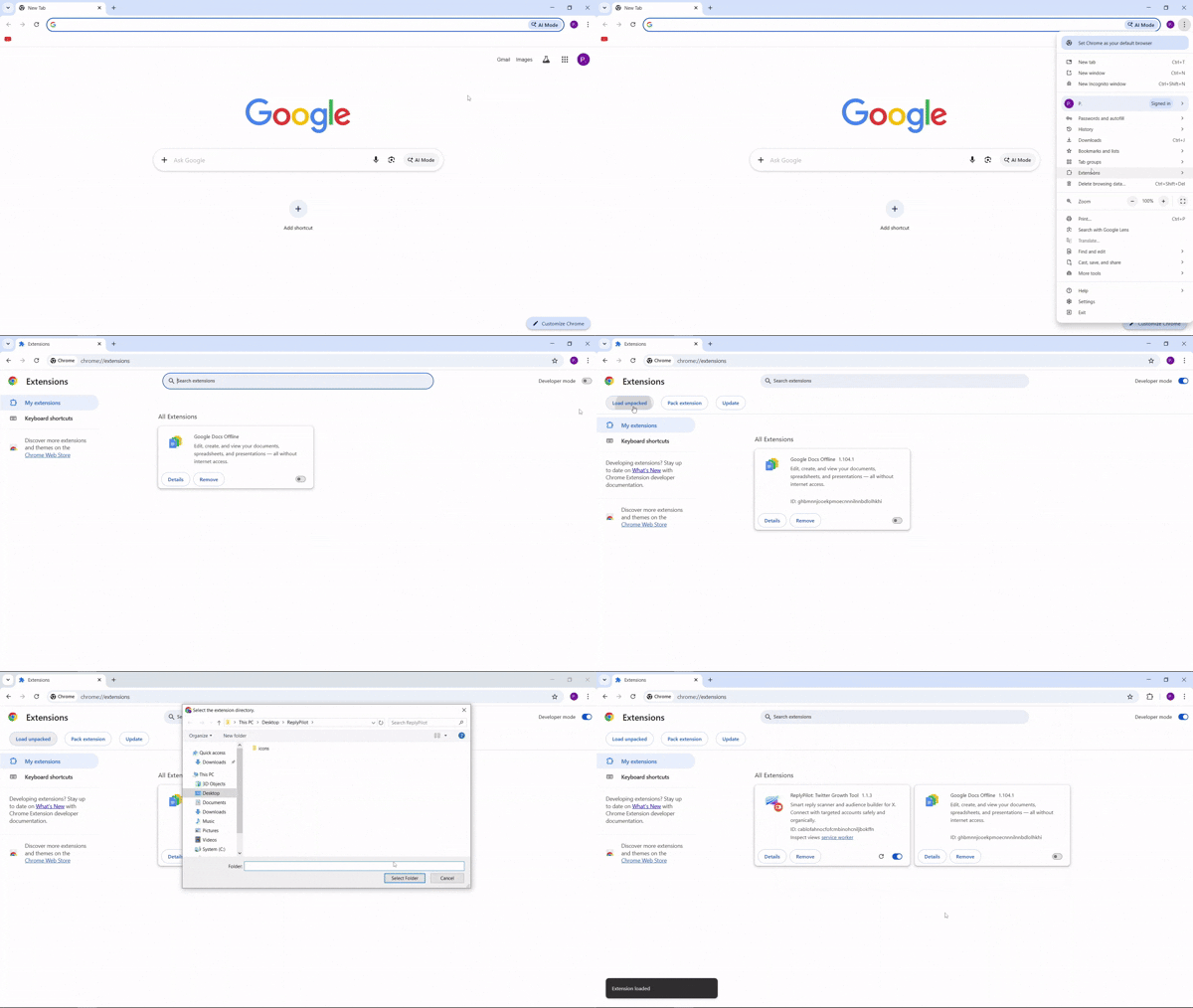
To update, download the latest ZIP file and extract its contents. Copy and replace all files in your current extension folder with the new ones. Finally, navigate to your browser’s extensions page and click the reload icon to activate the update immediately.
Can I use this tool for mass follow campaigns?
While ReplyPilot can handle high volumes of interactions, we strongly advise against aggressive mass follow tactics. Instead, our Smart Connect engine enforces multi-tier safety caps, a 2-week new-install warm-up ramp, and built-in Smart Breaks to maintain your account's trust score.
How can I learn to operate ReplyPilot v3.0 safely?
We believe in full transparency and account safety. You can access our comprehensive v3.0 User Manual to see how our Human-Emulation Engine works, configure AI Auto & Manual Replies, and follow our daily safety limits.