
A digital product partner page gives affiliates and other potential promoters the information they need to evaluate and promote your offer. It explains what the product does, who it is for, how the partner arrangement works, and where to find the materials needed for promotion.
If you want other people to help distribute a product, do not make them piece together the details from your homepage, checkout page, and scattered messages. Put the essential information in one organized place.
What Is a Digital Product Partner Page?
A digital product partner page is a dedicated page on your website for people who may promote your product in exchange for an agreed commission or another form of partnership.
It is sometimes called an affiliate page or JV page. The purpose is practical: give potential partners enough information to decide whether the offer fits their audience and explain what they need to do next.
It is different from your main sales page.
| Main sales page | Partner page |
|---|---|
| Written for potential customers | Written for potential promoters |
| Explains the product's value to buyers | Explains the offer and partnership |
| Encourages a purchase | Explains how to participate |
| Focuses on customer questions | Covers partner questions and resources |
A partner page should not simply repeat your sales copy. A promoter needs information that a typical customer may never ask about, including commission terms, promotional resources, tracking arrangements, and support.
The page also needs to be consistent with your product positioning. If you have not defined your audience, problem, and offer clearly, review the framework in Digital Product Positioning before building the partner page.
What to Include on Your Digital Product Partner Page
The exact layout depends on your product and partnership model. A useful starting point is to organize the page into sections that answer the questions a potential partner is likely to have.
1. Product overview
Start with a concise explanation of what you sell.
Include:
- Product name and format.
- The audience the product is designed for.
- The problem or task it addresses.
- Its main features and practical uses.
- Any important requirements or limitations.
Be specific. If you sell a software tool, explain what it helps users do and what they need to use it. If you sell an ebook, describe its subject, intended reader, and what the reader will find inside.
Avoid vague descriptions such as "a complete solution for everyone." A partner needs to understand the offer well enough to decide whether it is relevant to their audience.
2. Partnership terms
Explain how the partner arrangement works.
Depending on your program, this may include:
- Commission structure.
- Whether commissions apply to initial purchases, recurring payments, or both.
- Any conditions that affect commission eligibility.
- How referrals are tracked.
- How and when commissions are paid.
- Where partners can find the applicable terms.
Do not publish terms that you have not decided or cannot consistently honor. If a detail is still being finalized, resolve it before inviting people to promote the product.
Keep the language direct. A potential partner should not have to contact you just to understand the basic arrangement.
3. Promotional assets
Promoters often need more than a product description. They need materials they can adapt to their own communication style.
A partner resource section may include:
- Product descriptions in short and long formats.
- Suggested email copy.
- Social media copy.
- Product images and approved graphics.
- Screenshots or product demonstrations, where available.
- Frequently asked questions.
- A link to the main sales page.
Make it clear which materials are ready to use and which are examples that partners should adapt.
Do not imply that partners must use every supplied message word for word. Their audience, writing style, and communication rules may differ from yours.
4. Tracking and referral links
Explain how partners receive and use their referral links.
At a minimum, clarify:
- Where a partner obtains their tracking link.
- Which destination the link points to.
- How the referral is associated with the partner.
- Where the partner can check referral activity, if reporting is available.
- Who to contact if a link appears to be incorrect.
Only describe tracking features that your setup actually supports. Do not promise real-time reporting, permanent attribution, or specific tracking behavior unless you have verified those details.
A simple explanation is better than technical language that leaves partners unsure which link to share.
5. Support and contact information
Give partners a clear way to ask questions.
Include a contact method and explain what kinds of questions it is intended for. Common topics include access to promotional materials, referral-link problems, partnership terms, and product questions.
If you publish a response-time expectation, make sure you can maintain it. An unrealistic support promise can create unnecessary problems as the number of partner inquiries grows.
For a small operation, a dedicated contact address or form may be enough. The important point is that partners should know where to go when they need help.
How to Build the Page Step by Step
You do not need a complicated partner portal to create a useful starting point. A well-organized page on your own domain can bring the essential information together.
Step 1: Confirm the product offer
Before writing the page, check that your main product information is consistent.
Review:
- Product name and description.
- Intended audience.
- Price and checkout destination.
- Product delivery method.
- Support and refund information.
- Any requirements or limitations customers should understand.
Your partner page should not introduce a different version of the offer. If the product price or terms change, review the partner information as well.
The digital product launch checklist can help you review the wider product setup before inviting partners.
Step 2: Decide the partnership terms
Write down the terms before presenting them publicly.
You should know how commissions are calculated, which purchases qualify, how referrals are tracked, and how payments are handled. You should also decide how partners can join and whether you need to review applications.
Do not leave important terms open to interpretation. Ambiguity can lead to different expectations between you and your partners.
Step 3: Prepare the promotional materials
Create a small, consistent set of resources.
Start with a short product description, a longer description, a few promotional message examples, and approved product images. Add other materials when you have a clear use for them.
Check every asset before publishing it. Product descriptions, screenshots, links, and promotional claims should match the current offer.
Step 4: Organize the page around partner questions
Put the most important information near the top:
- What is the product?
- Who is it intended for?
- What are the partnership terms?
- How does someone join?
- Where are the promotional materials?
- Who provides support?
Use descriptive headings and short sections. A potential partner should be able to scan the page and find a specific answer without reading every paragraph.
Step 5: Test the complete experience
Review the page as if you were a potential partner who has never heard of your product.
Check that:
- The page loads and displays correctly.
- The product description is understandable.
- Partnership terms are easy to locate.
- Every promotional link works.
- Downloadable assets can be accessed.
- The application or signup process is clear.
- Contact information is correct.
- The page works on mobile devices.
Ask someone unfamiliar with the product to review it if possible. Their questions can reveal missing information that may seem obvious to you.
Common Digital Product Partner Page Mistakes
A partner page can contain all the expected sections and still be difficult to use. Watch for these problems.
Treating it as another sales page
A sales page is designed to explain the product to buyers. A partner page needs to explain the partnership as well.
Repeating the same sales copy without adding commission terms, tracking details, and promotional resources leaves important questions unanswered.
Leaving out practical terms
Statements such as "generous commissions" or "simple affiliate program" do not explain how the arrangement works.
Use clear terms instead. If a commission rate, payment schedule, or eligibility rule has not been established, do not imply that it has.
Providing outdated promotional assets
Old prices, discontinued features, broken links, and inaccurate screenshots can create confusion.
Assign responsibility for reviewing the page whenever the product, offer, or partnership terms change. Even a simple review checklist can help keep the information consistent.
Making claims partners cannot verify
Promotional copy should reflect what the product actually does. Avoid claims about customer outcomes that you cannot substantiate.
Partners need accurate information to communicate responsibly with their audiences. Clear product details are more useful than exaggerated claims.
A Practical Partner Page Checklist
Before sharing your page, use this checklist to review the essentials.
- [ ] Product name, format, and description are accurate.
- [ ] Intended audience is clearly identified.
- [ ] Main product features and limitations are explained.
- [ ] Partnership terms are documented.
- [ ] Referral-link instructions are included.
- [ ] Tracking information reflects the actual setup.
- [ ] Promotional copy and images are available.
- [ ] Main sales page and checkout links work.
- [ ] Partner signup or application instructions are clear.
- [ ] Contact information is correct.
- [ ] Page layout works on desktop and mobile.
- [ ] Outdated or unsupported claims have been removed.
You can use this checklist as a starting point and add requirements specific to your product or partnership model.
Key Takeaways
- A digital product partner page explains your offer and partnership arrangement to potential promoters.
- Keep it separate from the main sales page because partners need information about commissions, tracking, promotional assets, and support.
- Publish only terms and features that your business has actually established.
- Organize the page around the questions a potential partner is likely to ask.
- Review the page whenever the product, pricing, partnership terms, or promotional materials change.
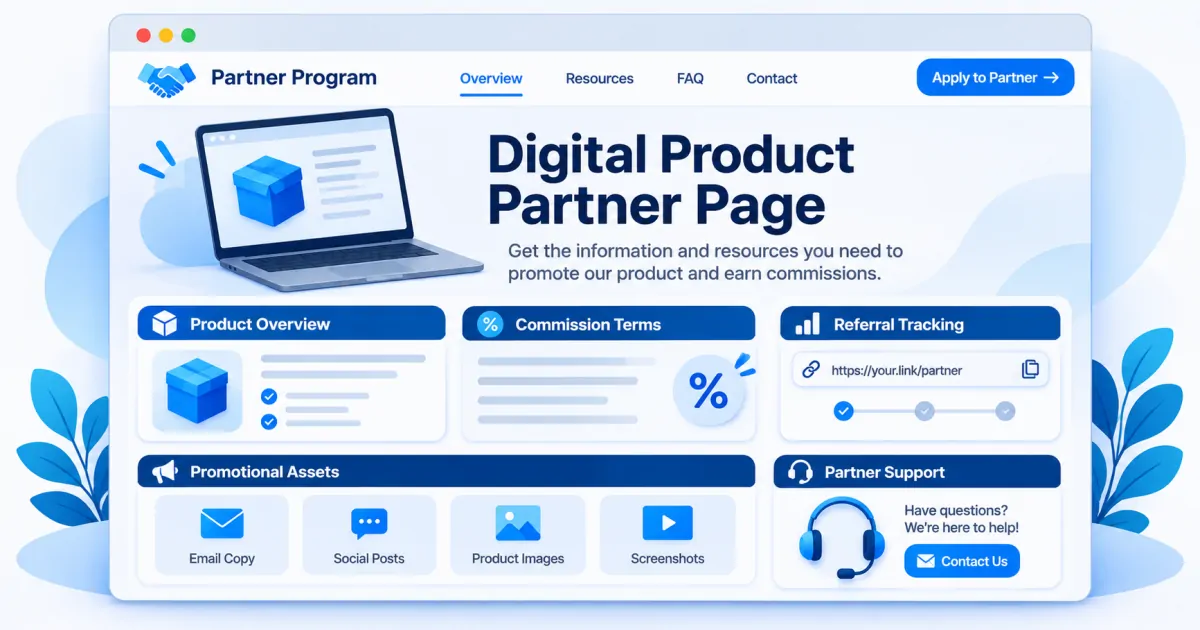
TODO: Create a clean 1200x630 illustration of a digital product partner page layout, showing clearly labeled sections for product overview, commission terms, referral tracking, promotional assets, and partner support. Use a simple website wireframe style.