
AI Reply Drafts for X, Facebook & Quora
You Review, Edit & Post Yourself — Never Auto-Posts
Click "✨ Suggest reply" to draft natural replies, comments, and answers using your own Groq, Google Gemini, or OpenAI API key. Pick your tone, filter out robotic AI phrases, optionally weave in your product or website, and insert the draft straight into the reply box.
One Extension, Three Major Platforms
X (Twitter) Posts & Threads
Adds an inline "✨ Suggest reply" button right inside the X reply toolbar plus a floating button on tweet pages. Generates punchy, natural drafts (default 40–180 characters, counting links accurately as 23 characters).
Facebook Posts, Groups & Replies
Click any post comment box, group discussion box, or nested comment reply box, then click the floating button. Reads the post or comment context (including image alt descriptions on image-only posts) to draft warm, relevant comments.
Quora Questions & Answers
Click inside a Quora answer editor to draft structured, multi-paragraph answers (default 100–300 words), or highlight any existing answer or comment on the page to draft a sharp, direct reply to those exact points.
Core Features
Built for creators, indie makers, and professionals who want fast drafts that sound genuinely human.
Bring Your Own API Key (BYOK)
Connect Groq (default llama-3.3-70b-versatile), Google Gemini (gemini-2.0-flash), or OpenAI (gpt-4o-mini). Includes automatic provider fallback and live model list recovery if a model changes.
5 Tones & 5 Reply Approaches
Pick your tone on the fly (Friendly, Direct, Lightly witty, Professional, Curious) and set your approach: Auto, Agree + detail, Ask a follow-up question, Add a perspective, or Politely counter.
Banned Phrases & Anti-AI Filters
Comes pre-loaded with a customizable banned-phrases list (blocking "delve", "game changer", "great post", "spot on", etc.), emoji rules (None, Few, Natural), automatic hashtag stripping, and em/en-dash removal.
Smart Product Mentions (PRO)
Configure up to 2 products, websites, services, tools, or communities. Choose to mention them With link, Name only, or as a Soft offer across 5 distinct voices (Maker, User, Recommender, Helper First, Neutral) with honest relationship disclosures.
AI Link Summarizer (PRO)
Paste your landing page URL in Settings and click "Create from link with AI". ReplyHelper fetches your page, detects whether it is a product, website, tool, or service, and summarizes its real facts automatically.
Persona, Examples & 16 Languages
Train Pro drafts with your custom Persona and up to 6 real writing examples. Use the interface in 16 languages while generating replies in the post's original language or any language you specify.
How It Works in 4 Simple Steps
Set up in two minutes. Your API keys and settings stay locally in your browser.
Add Your AI Key
Open ReplyHelper Settings and paste your API key from Groq, Google Gemini, or OpenAI. Click Test to verify in one click.
Click a Reply Box
Open a post on X, Facebook, or Quora (or highlight an answer on Quora), click the reply/comment editor, and click "✨ Suggest reply".
Pick Tone & Mention
Select your tone chip (e.g. Friendly, Direct, Witty) and optional Pro product mention style (With link, Name only, Soft offer), then click "✨ Create drafts".
Insert, Edit & Post
Click any generated draft to place it directly into the reply box. Review, tweak it in your own words, and hit Post yourself.
Why ReplyHelper Feels Different
Most AI reply extensions lock you into expensive monthly subscriptions, output robotic phrases that sound fake, or risk your account with blind auto-posting. ReplyHelper puts you in complete control.
Blind Auto-Posting Risks
Automated comment bots submit replies without human review, leading to embarrassing off-topic comments and platform penalties.
- Posts unreviewed text directly to public threads
- High risk of account restrictions & bans
- Misinterprets sarcasm or sensitive posts
- Breaks X Draft.js & Facebook Lexical editors
- Zero human quality control
100% Human-in-the-Loop Control
ReplyHelper never presses Post or Send. It generates multiple distinct angles and cleanly inserts your chosen draft into the editor for you to review.
- You read, edit, and post every single reply
- Native clipboard-event insertion keeps editor state clean
- Up to 5 distinct draft angles per click (default 3)
- Caches drafts so they survive page scrolling/re-renders
- Safe for personal and brand accounts
Monthly Subscriptions & Robotic Phrasing
Typical AI extensions charge $19–$49/month just to middleman basic API calls while producing repetitive "Great point! 🚀" replies.
- Recurring monthly subscription fees
- Full of "delve", "game changer", and em-dashes
- One-size-fits-all character limits
- Middleman servers log your prompts and posts
- Locked to a single provider
BYOK Freedom & Banned-Phrase Filter
Use fast, free API tiers from Groq or Google Gemini (or your own OpenAI key) with strict formatting rules that strip out robotic AI tells.
- Direct browser-to-provider API calls (nothing sent to us)
- Customizable banned words & phrases list
- Strips em-dashes, en-dashes, and unwanted hashtags
- Per-site length profiles (chars or words) for X, FB & Quora
- One-time Pro upgrade — no recurring subscription
Hype-Filled Link Dropping
Forcing a sales pitch into every comment makes you look like a spam bot and alienates potential customers.
- Aggressive "Check out my app!" sales language
- Invents fake features, numbers, or claims
- Hides relationship or affiliate bias
- Every promotional comment sounds identical
- Gets flagged by community moderators
Honest, Multi-Voice Product Mentions
ReplyHelper bridges to your product or website naturally, rotates across 5 authentic voices, and respects your real relationship to the item.
- 3 mention styles: With link, Name only, or Soft offer
- 5 voices: Maker, Daily User, Measured Recommender, Helper, Neutral
- Supports Owner, Partner/Affiliate (auto-adds
(Ad)), or Independent - Strictly uses facts from your description — zero hype or fake claims
- Normal drafts actively block accidental product mentions
Privacy-First Installation
Simple, One-Time Pricing.
ReplyHelper Free
- 5 reply suggestions per day
- Works on X, Facebook & Quora
- Bring your own Groq, Gemini, or OpenAI key
- All 5 Tones & 5 Reply Approaches
- Per-site length limits & banned phrases filter
- 16 interface languages
- Mention your product or website in drafts
- AI product page URL summarizer
- Custom Persona & writing examples
- Export & Import settings backup
ReplyHelper PRO
- Unlimited daily suggestions (up to your API cap)
- Mention up to 2 products or websites in drafts
- 3 mention styles: With link, Name only, Soft offer
- 5 Promotion Voices + honest disclosures
- "Create from link with AI" page summarizer
- Custom Persona & up to 6 writing examples
- Export & Import settings backup
- 2 Browser Installations (with self-serve release)
Frequently Asked Questions
Does ReplyHelper ever post replies automatically?
No. ReplyHelper only drafts text and places the draft you click into the reply, comment, or answer box (or copies it to your clipboard if the editor cannot be filled). You always read, edit, and press Post yourself.
Do I need my own AI API key? Is it free?
Yes. ReplyHelper uses a Bring Your Own Key (BYOK) model supporting Groq, Google Gemini, and OpenAI. Both Groq and Google Gemini offer generous free API tiers that take about two minutes to set up, and Settings includes a step-by-step guide.
How is my privacy protected?
Your API keys and settings are stored locally inside your browser. When you click to create drafts, the text of the post you are replying to goes directly from your browser to the AI provider you chose (Groq, Google, or OpenAI). Nothing is sent to our servers. We do not use analytics, tracking pixels, or usage profiling.
How do Product & Website Mentions work in the Pro plan?
In Settings, you can configure up to 2 items (a product, website, service, tool, community, or project) along with your relationship to it (Owner/Maker, Partner/Affiliate, or Independent user). When creating drafts, you can pick whether to include a link, mention the name only, or make a soft offer. Each draft uses a different voice (Maker, User, Measured Recommendation, Helper First, or Neutral), and Partner/Affiliate mentions automatically include a plain disclosure such as (Ad) or (Quảng cáo).
How many devices can I use with one Pro license key?
Each Pro license key can be activated on up to 2 browsers or devices at the same time. You can move your license to another browser anytime by clicking "Release this device" in ReplyHelper Settings, or by resetting your key from your Whop order page.
What happens if I'm offline or the license server is unreachable?
Once activated, ReplyHelper re-checks your Pro license at most once every 24 hours when used and includes a 7-day offline grace period, so your workflow is never interrupted by temporary network issues.
How do I update to the latest version?
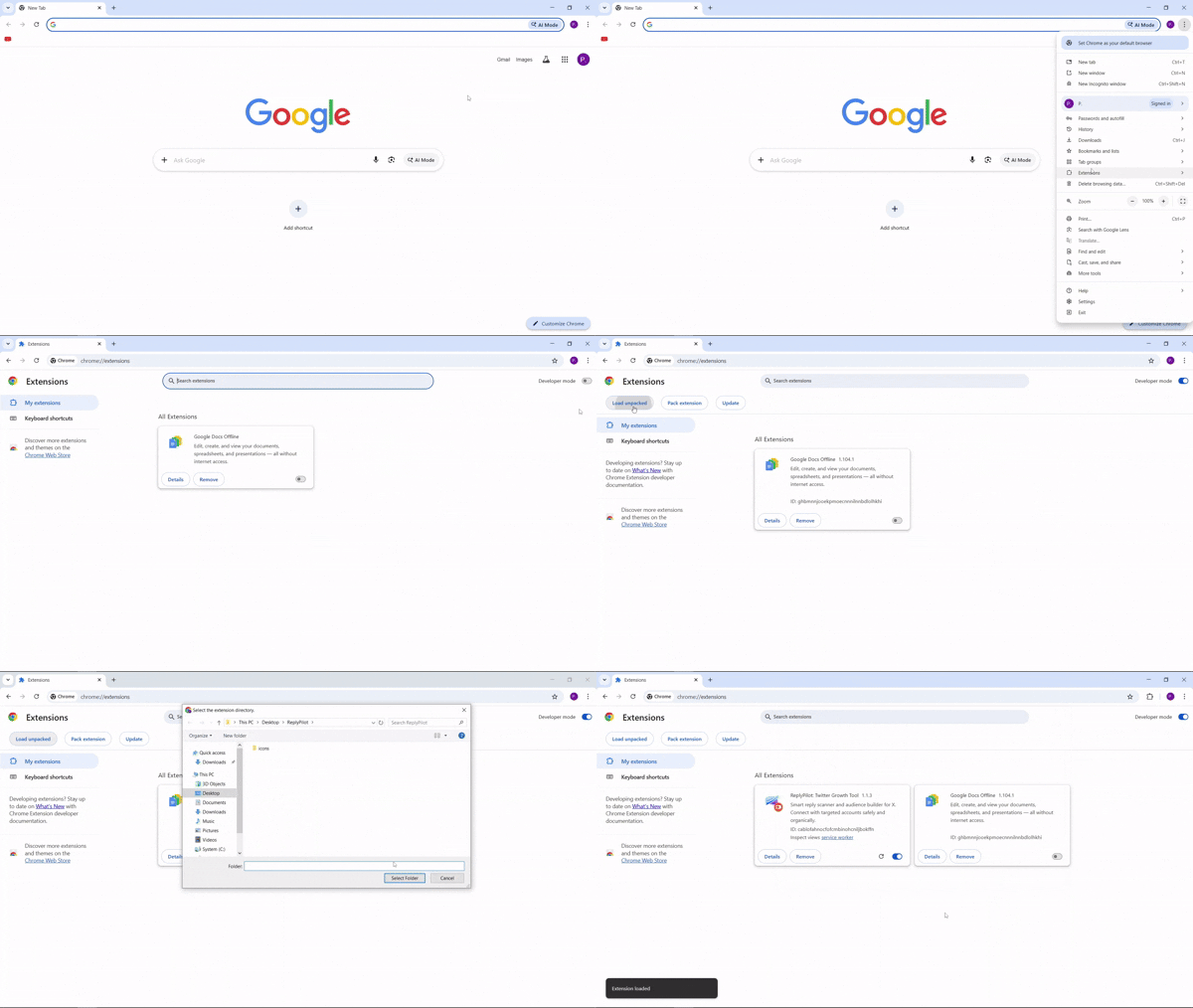
To update a manual installation, download the latest ZIP file and extract its contents. Copy and replace all files in your current extension folder with the new ones. Finally, navigate to your browser’s extensions page and click the reload icon to activate the update immediately.
How can I learn to operate ReplyHelper effectively?
We believe in full transparency and complete user control. You can access our comprehensive User Manual to learn how to set up your API keys, configure per-site lengths, use Pro product mentions, and troubleshoot browser permissions.