
A business email extractor helps you collect publicly listed business contact email addresses from websites you choose. Before using one, understand how it collects information, what its technical limitations are, and what responsibilities come with handling the resulting data.
This guide explains the basic workflow and how to use Email Lead Extractor, a free Windows desktop app from Launch System Lab.
What Is a Business Email Extractor?
A business email extractor is a tool that identifies email addresses published on business websites and collects them into a structured list.
Instead of manually opening every page and copying contact details, you use a tool to inspect selected websites and organize the addresses it finds.
For example, you might research:
- A company's public contact page.
- A business website's general inquiry page.
- A service provider's published contact information.
- A supplier's website.
- An organization's publicly listed business email address.
The purpose is to organize publicly available business contact information for research and appropriate B2B communication.
An extractor does not automatically establish that an address is current, that its owner wants to receive marketing messages, or that you have permission to contact it. Those are separate questions you must consider before using the data.
What Email Lead Extractor does
Email Lead Extractor is a free desktop application for Windows 10 and Windows 11.
Its documented capabilities include:
- Collecting publicly listed business contact emails from websites you choose.
- Starting with lightweight HTTP requests to retrieve website content.
- Using a browser fallback for pages that need a real browser to load, where automated access is allowed.
- Saving collected email addresses to a CSV file on your computer.
The tool is also offered as a free gift with Sell What You Built.
It is designed for collecting business contact information from selected websites. It should not be treated as a tool for collecting personal email addresses or building indiscriminate mailing lists.
How Email Extraction Works
Understanding the basic process helps you interpret the output and recognize why some websites may produce different results.
1. Select the websites you want to research
Start by identifying websites that are relevant to your business research.
For example, if you provide software services to small companies, you might research the websites of businesses in an industry you understand.
Choose sites where the contact information is relevant to your intended business purpose. Avoid collecting information simply because a website makes it accessible.
Before collecting anything, review the website's terms of service and robots rules, including any applicable instructions in its robots.txt file. Do not collect information from pages or through methods you are not allowed to access.
2. The tool requests website content
Email Lead Extractor starts with lightweight HTTP requests.
An HTTP request allows an application to retrieve content from a website without opening a full browser window. This approach can be suitable for pages that return their content directly.
However, not every website works the same way. Some pages depend on browser-based functionality before their content becomes available.
That means a lightweight request may not retrieve everything visible when you visit the page in a browser.
3. Some pages may need a browser fallback
For pages that need a real browser to load, Email Lead Extractor can use a browser fallback.
This provides another way to load website content when a basic request is insufficient. It does not mean every website can be accessed or that website restrictions should be ignored.
Only use automated access where the website permits it. If a site restricts automated collection, respect that restriction rather than trying to work around it.
4. Collected addresses are saved as CSV
The application saves collected email addresses in a CSV file on your computer.
CSV is a plain tabular format that can be opened by spreadsheet applications and imported into many contact-management tools.
A basic workflow looks like this:
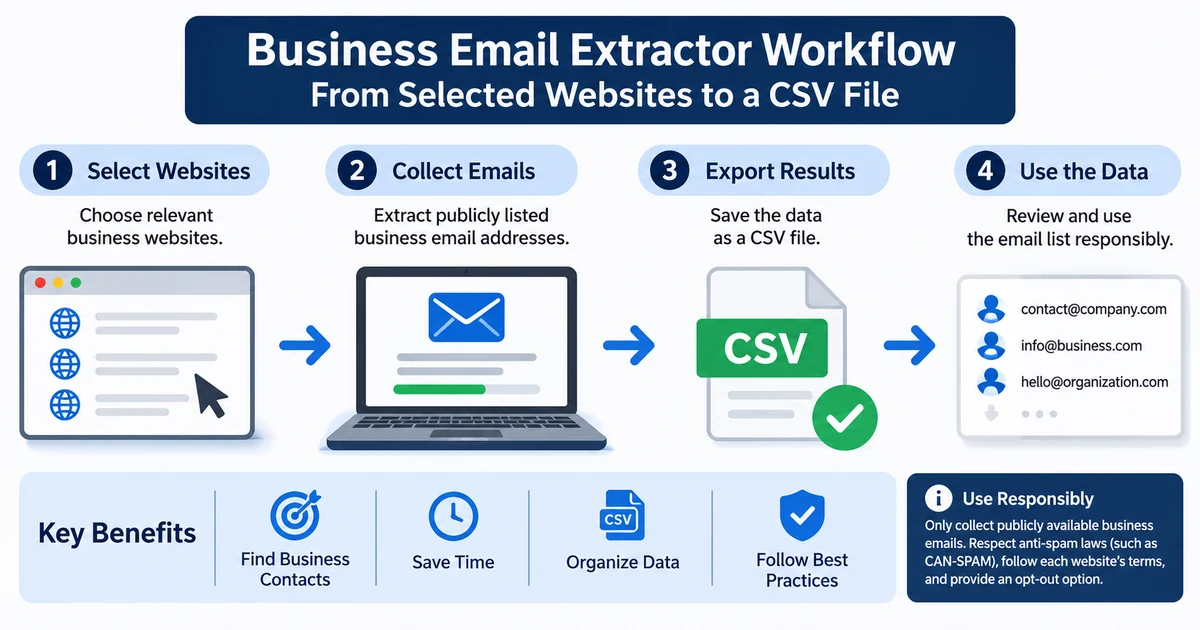
The CSV export gives you a structured starting point for reviewing the information. It does not replace the work of checking, organizing, and deciding whether each address is appropriate to use.
How to Use Email Lead Extractor
The following workflow describes the practical stages of using the tool without assuming that every website will return the same information.
Step 1: Get the application
Visit the Email Lead Extractor product page to access the free tool.
The download link is sent to the email address you provide, so an email address is required to receive it.
Check that your computer meets the supported operating system requirements: Windows 10 or Windows 11.
Step 2: Choose relevant business websites
Prepare a list of websites you have a legitimate reason to research.
A useful starting list might include:
- Companies whose services are relevant to your product.
- Businesses in an industry you serve.
- Suppliers or professional service providers.
- Organizations with publicly listed business contact pages.
Keep the scope focused. A smaller list of relevant websites is easier to review than a broad collection of unrelated domains.
Step 3: Run the collection process
Use the application to collect publicly listed business email addresses from the websites you selected.
The tool begins with lightweight HTTP requests and may use its browser fallback for pages that need a real browser to load.
Results can vary depending on how each website is built and what information it publishes. A website may not expose an email address in the content the tool can access.
Do not assume that an empty result means a business has no contact email. It may simply mean that the address was not available through the collection process.
Step 4: Review the CSV export
After collection, review the exported file before using it elsewhere.
A practical review process includes:
- Remove duplicate entries.
- Check whether each address appears to belong to a business.
- Review the website associated with the address.
- Remove irrelevant or unsuitable entries.
- Separate contacts by business category or research purpose.
- Keep track of addresses that should not be contacted again.
Do not assume that every extracted address is valid, monitored, or appropriate for outreach.
Step 5: Decide whether contact is appropriate
Finding an address is not the same as receiving permission to send a marketing email.
Before contacting anyone, consider the purpose of your message, the recipient's location, the applicable laws, and the website's terms.
If you cannot establish that your intended use is permitted, do not use the address for that purpose.
What to Check Before Using Extracted Emails
Collecting business contact information is only one part of the process. How you handle the information afterward matters just as much.
| Check | What to review |
|---|---|
| Business relevance | Does the address relate to the organization and purpose you researched? |
| Public availability | Was the address publicly listed on a website you were allowed to access? |
| Website terms | Do the website's terms permit the collection method you intend to use? |
| Robots rules | Have you checked the website's robots rules and applicable robots.txt instructions? |
| Data protection | Do the laws where you and your recipients are located allow your intended collection and use? |
| Message relevance | Is your B2B communication honest and relevant to the recipient's business? |
| Sender identity | Does your message clearly identify who is contacting the recipient? |
| Opt-out | Can recipients ask you to stop contacting them, and will you honor that request? |
Public information is not automatic permission
An email address may be visible on a company's website, but that does not mean its owner has agreed to receive promotional messages.
Treat the address as business contact information that still requires responsible handling.
Avoid:
- Collecting personal, non-business email addresses.
- Sending bulk unsolicited email.
- Using misleading sender details or subject lines.
- Sending irrelevant messages to unrelated businesses.
- Continuing to contact people who have asked you to stop.
- Collecting information from websites where automated access is not allowed.
For B2B outreach, use relevant and honest messages, identify yourself clearly, provide an appropriate opt-out, and honor removal requests.
CAN-SPAM and commercial B2B email in the United States
In the United States, the CAN-SPAM Act applies to commercial email, including B2B messages. A business-to-business message is not automatically exempt simply because it is sent to a company rather than an individual consumer.
The requirements include several practical obligations:
- Do not use false or misleading sender information or email headers.
- Do not use deceptive subject lines.
- Identify the message as an advertisement where required.
- Include a valid physical postal address.
- Provide a clear way for recipients to opt out of future commercial messages.
- Honor opt-out requests within 10 business days.
- Do not charge a fee or require unnecessary steps to process an opt-out.
There are also consequences for how addresses are collected. Harvesting email addresses through automated means is treated as an aggravating factor under CAN-SPAM. Penalties can apply per email, so sending at scale can increase exposure.
These points are a practical overview, not a complete statement of every legal requirement or exception. Review the rules that apply to your specific situation before sending commercial email.
Rules outside the United States
Email marketing and data-protection requirements differ across countries. Other countries have stricter rules; check where your recipients live.
Do not assume that a collection or outreach practice permitted in one location is permitted in another. Check the applicable requirements before collecting or contacting business addresses across borders.
Check the website's own access rules
The website from which you collect information may have its own terms of service and rules for automated access.
Review the relevant website's terms and robots rules before collecting information. Do not treat publicly visible content as permission to ignore those restrictions.
Separately, review Launch System Lab's Terms of Service before downloading or using the application.
Check the laws that apply where you are located and where your recipients live. This article provides general information, not legal advice.
Where a CSV Export Fits Into a Business Workflow
A CSV file is useful because it gives you a structured format that can be reviewed and organized before any further action.
For example, you might use a spreadsheet to separate contacts by:
- Industry.
- Company type.
- Website.
- Research category.
- Review status.
- Contact status.
- Opt-out status.
You can then decide which records are relevant to your work and which should be excluded.
If you use a CRM or another contact-management system, check its import requirements before uploading the file. Different systems may expect different column names or formats.
A CSV export can be one input to a B2B prospect research process. It is not a ready-made marketing list. Review the data first and retain only information you have a legitimate reason to keep and use.
Keep your process simple. You do not need to import every collected address into a mailing platform.
Frequently Asked Questions
Is Email Lead Extractor free?
Yes. Email Lead Extractor is a free Windows desktop application for Windows 10 and Windows 11.
Do I need an email address to download it?
Yes. The download link is sent to the email address you provide.
Does it collect email addresses from every website?
No such guarantee is made. The tool uses lightweight HTTP requests and has a browser fallback for pages that need a real browser to load. Results depend on the website and whether automated access is allowed.
Can I export the collected addresses?
Yes. Email Lead Extractor saves collected email addresses to a CSV file on your computer.
Can I use the extracted addresses for cold email campaigns?
Having an address does not automatically give you permission to email it. You must consider applicable anti-spam and data-protection laws, website terms, and whether your intended message is appropriate.
For US commercial email, this includes CAN-SPAM requirements that apply to B2B messages. Do not use the tool for bulk unsolicited email.
Does CAN-SPAM apply to B2B email?
Yes. CAN-SPAM applies to commercial email, including B2B messages. Requirements include accurate sender information, non-deceptive subject lines, a valid physical postal address, and a working opt-out process. Opt-out requests must be honored within 10 business days.
Is the tool also included with Sell What You Built?
Yes. Email Lead Extractor is also offered as a free gift with Sell What You Built.
Key Takeaways
- A business email extractor collects publicly listed business contact email addresses from websites you choose.
- Email Lead Extractor is a free Windows 10/11 desktop app that exports collected addresses to CSV.
- The application starts with lightweight HTTP requests and has a browser fallback for pages that need a real browser to load, where automated access is allowed.
- Extraction results depend on the website and should be reviewed before use.
- A publicly listed email address is not automatic permission to send marketing messages.
- CAN-SPAM applies to US commercial B2B email and includes sender identification, postal address, and opt-out requirements.
- Follow website terms, robots rules, applicable anti-spam and data-protection laws, and responsible business communication practices.